S01 agent loop
2026年3月4日
s01 agent loop
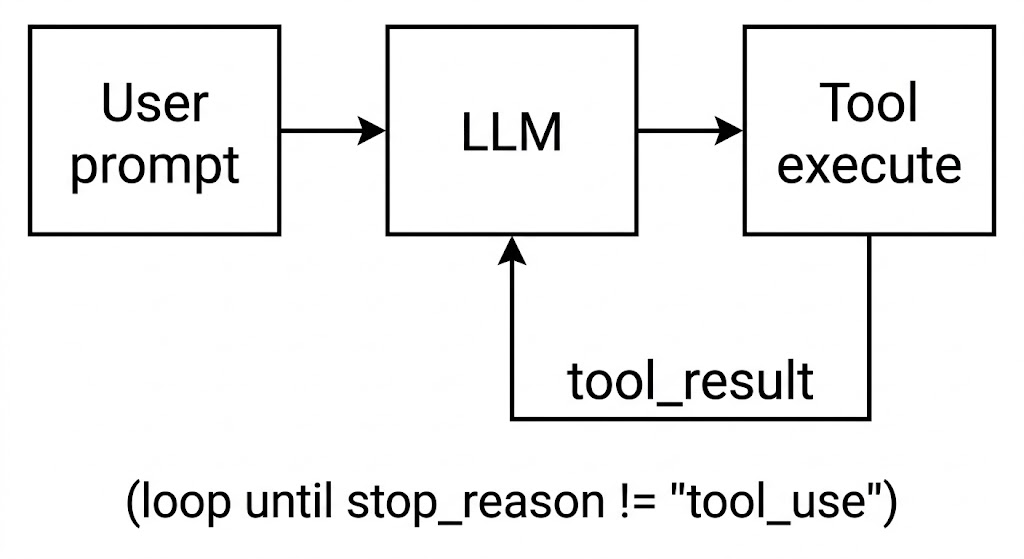
import os
import subprocess
from anthropic import Anthropic
from dotenv import load_dotenv

load_dotenv(override=True)
if os.getenv("ANTHROPIC_BASE_URL"):
    os.environ.pop("ANTHROPIC_AUTH_TOKEN", None)

client = Anthropic(base_url=os.getenv("ANTHROPIC_BASE_URL"))
COMMON_MODELS = [
    "claude-sonnet-4-6",
    "gemini-2.5-flash",
    "gpt-3.5-turbo",
    "deepseek-chat",
    "deepseek-r1",
    "glm-4.5",
    "qwen-plus",
    "kimi-k2.5",
    "MiniMax-M2.1",
]
MODEL = os.getenv("MODEL_ID")

def choose_model(current_model: str) -> str:
    print("\033[35m选择模型:\033[0m")
    for idx, name in enumerate(COMMON_MODELS, start=1):
        print(f"{idx}. {name}")
    print(f"{len(COMMON_MODELS)+1}. 自定义输入")
    choice = input(f"\033[35m模型编号(回车沿用: {current_model})>> \033[0m").strip()
    if not choice:
        return current_model

    if choice.isdigit():
        index = int(choice)
        if 1 <= index <= len(COMMON_MODELS):
            return COMMON_MODELS[index-1]
        elif index == len(COMMON_MODELS) + 1:
            return input("\033[35m请输入自定义模型ID>> \033[0m").strip()
    print("\033[31m无效输入,请输入模型编号\033[0m")
    return choose_model(current_model)


SYSTEM = f"You are a coding agent at {os.getcwd()}. Use bash to solve tasks. Act, don't explain."

TOOLS = [{
    "name": "bash",
    "description": "Run a shell command.",
    "input_schema": {
        "type": "object",
        "properties": {         # 定义 command 参数
            "command": {
                "type": "string",
                "description": "The shell command to run"
            }
        },
        "required": ["command"] # 必须包含 command 参数
    },
}]

def run_bash(command: str) -> str:
    dangerous = ["rm -rf /", "sudo", "shutdown", "reboot", "> /dev/"]
    if any(d in command for d in dangerous):
        return "Error: Dangerous command blocked"
    try:
        r = subprocess.run(command, shell=True, cwd=os.getcwd(),
                           capture_output=True, text=True, timeout=120,
                           encoding='utf-8', errors='replace') # 显式指定 utf-8 并替换乱码
        out = (r.stdout + r.stderr).strip()
        return out[:50000] if out else "(no output)"
    except subprocess.TimeoutExpired:
        return "Error: Timeout (120s)"

def agent_loop(messages: list):
    while True:
        with client.messages.stream(
            model=MODEL, system=SYSTEM, messages=messages,
            tools=TOOLS, max_tokens=8000
        ) as stream:
            # 遍历 text_stream,实现打字机效果的实时输出
            # end="" 防止了每次打印都换行
            # flush=True 会强制 Python 绕过系统缓冲区,立刻把接收到的字符推送到终端屏幕上
            for text in stream.text_stream:
                print(text, end="", flush=True)

            print()
            # 阻塞等待,直到获取完整的 Message 对象
            response = stream.get_final_message()

        messages.append({"role": "assistant", "content": response.content})
        # 如果不是工具调用,直接返回
        if response.stop_reason != "tool_use":
            return

        results = []
        for block in response.content:
            if block.type == "tool_use":
                print(f"\033[33m$ {block.input['command']}\033[0m")
                output = run_bash(block.input["command"])
                print(output[:200])
                results.append({
                    "type": "tool_result",
                    "tool_use_id": block.id,
                    "content": output
                })
        messages.append({"role": "user", "content": results})


if __name__ == "__main__":
    history = []
    while True:
        MODEL = choose_model(MODEL)
        try:
            query = input(f"\033[36ms01 ({MODEL}) >> \033[0m")
        except (EOFError, KeyboardInterrupt): # 捕获 Ctrl+D 和 Ctrl+C
            break
        if query.strip().lower() in ("exit", "q", ""):
            break

        history.append({"role": "user", "content": query})
        agent_loop(history)
        response_content = history[-1]["content"] # 提取助手的回复
        if isinstance(response_content, list): # 检查是否为列表
            for block in response_content:
                if hasattr(block, "text"):
                    print(block.text)
        print()
">> What are the differences and connections between a 'skill' and a 'function call'?"
(llm) D:\code\Agent\learn-claude-code>python agents\s01_agent_loop.py
s01 >> What are the differences and connections between a 'skill' and a 'function call'?
$ find D:\code\Agent\learn-claude-code -type f | head -50
'head' 不是内部或外部命令,也不是可运行的程序
或批处理文件。
$ dir /s /b D:\code\Agent\learn-claude-code
D:\code\Agent\learn-claude-code\.env
D:\code\Agent\learn-claude-code\.env.example
D:\code\Agent\learn-claude-code\.github
D:\code\Agent\learn-claude-code\.gitignore
D:\code\Agent\learn-claude-code\.vs
$ type D:\code\Agent\learn-claude-code\agents\s02_tool_use.py
#!/usr/bin/env python3
"""
s02_tool_use.py - Tools

The agent loop from s01 didn't change. We just added tools to the array
and a dispatch map to route calls.

    +----------+      +-------+      +--
$ type D:\code\Agent\learn-claude-code\agents\s05_skill_loading.py
#!/usr/bin/env python3
"""
s05_skill_loading.py - Skills

Two-layer skill injection that avoids bloating the system prompt:

    Layer 1 (cheap): skill names in system prompt (~100 tokens/skill)
    L
$ type D:\code\Agent\learn-claude-code\docs\en\s02-tool-use.md && echo "===" && type D:\code\Agent\learn-claude-code\docs\en\s05-skill-loading.md
# s02: Tool Use

`s01 > [ s02 ] s03 > s04 > s05 > s06 | s07 > s08 > s09 > s10 > s11 > s12`

> *"Adding a tool means adding one handler"* -- the loop stays the same; new tools register into the dispatc
$ type D:\code\Agent\learn-claude-code\skills\pdf\SKILL.md && echo "===" && type D:\code\Agent\learn-claude-code\skills\code-review\SKILL.md
---
name: pdf

> *"Adding a tool means adding one handler"* -- the loop stays the same; new tools register into the dispatc
$ type D:\code\Agent\learn-claude-code\skills\pdf\SKILL.md && echo "===" && type D:\code\Agent\learn-claude-code\skills\code-review\SKILL.md
---
name: pdf
$ type D:\code\Agent\learn-claude-code\skills\pdf\SKILL.md && echo "===" && type D:\code\Agent\learn-claude-code\skills\code-review\SKILL.md
---
name: pdf
---
name: pdf
name: pdf
description: Process PDF files - extract text, create PDFs, merge documents. Use when user asks to read PDF, create PDF, or work with PDF files.
---

# PDF Processing Skill

You now have
$ type D:\code\Agent\learn-claude-code\skills\agent-builder\SKILL.md
---
name: agent-builder
description: |
  Design and build AI agents for any domain. Use when users:
  (1) ask to "create an agent", "build an assistant", or "design an AI system"
  (2) want to underst
Now I have a thorough understanding of the codebase. Here is a comprehensive explanation:

---

## 🔧 Function Call vs. 💡 Skill — Differences and Connections

Based on the actual code in this repository, here is a precise breakdown:

---

### What is a **Function Call** (Tool Call)?

A **function call** (also called a **tool call**) is the mechanism by which the LLM requests the **execution of a concrete action** during the agent loop.

In this project, the tools are defined in `TOOLS` and dispatched via `TOOL_HANDLERS`:

```python
# s02_tool_use.py

TOOL_HANDLERS = {
    "bash":       lambda **kw: run_bash(kw["command"]),      # ← A function call
    "read_file":  lambda **kw: run_read(kw["path"], ...),    # ← A function call
    "write_file": lambda **kw: run_write(kw["path"], ...),   # ← A function call
    "edit_file":  lambda **kw: run_edit(kw["path"], ...),    # ← A function call
}
```

**Key properties:**
| Property | Detail |
|---|---|
| **Nature** | Executes side effects on the real world (filesystem, shell, network) |
| **Triggering** | LLM emits `stop_reason = "tool_use"`, agent extracts `block.input` and dispatches |
| **Output** | Returns a `tool_result` string back into the conversation |
| **Scope** | Single, atomic operation (run one command, read one file) |
| **Token cost** | Low — only input params + result text |
| **Defined in** | `TOOLS` list (schema for the LLM) + `TOOL_HANDLERS` dict (implementation) |

---

### What is a **Skill**?

A **skill** is a **bundle of domain knowledge** (text/instructions) stored in a `SKILL.md` file and loaded **on demand** into the conversation via — you guessed it — a function call (`load_skill`).

```
skills/
  pdf/
    SKILL.md        ← contains YAML frontmatter (name, description) + full body
  code-review/
    SKILL.md
  agent-builder/
    SKILL.md
```

```python
# s05_skill_loading.py

TOOL_HANDLERS = {
    ...
    "load_skill": lambda **kw: SKILL_LOADER.get_content(kw["name"]),  # ← delivers the skill body
}
```

When the LLM calls `load_skill("pdf")`, it receives back the entire PDF processing guide as a `tool_result`.

**Key properties:**
| Property | Detail |
|---|---|
| **Nature** | Injects **knowledge/instructions**, not actions |
| **Triggering** | LLM calls the `load_skill` tool by name |
| **Output** | Returns the full `SKILL.md` body wrapped in `<skill>` tags |
| **Scope** | Broad domain expertise (checklists, patterns, workflows) |
| **Token cost** | Higher (2000+ tokens per skill body), but only paid when needed |
| **Defined in** | `skills/*/SKILL.md` files on disk |

---

### The Two-Layer Design (The Key Insight)

The `s05_skill_loading.py` introduces a clever **two-layer** architecture:

```
Layer 1 — System Prompt (always present, cheap ~100 tokens/skill):
┌──────────────────────────────────────┐
│  Skills available:                   │
│    - pdf: Process PDF files...       │  ← Just names + descriptions
│    - code-review: Review code...     │
│    - agent-builder: Build agents...  │
└──────────────────────────────────────┘

Layer 2 — tool_result (on demand, expensive ~2000 tokens):
┌──────────────────────────────────────┐
│  <skill name="pdf">                  │
│    # PDF Processing Skill            │  ← Full body, only when called
│    ## Reading PDFs ...               │
│  </skill>                            │
└──────────────────────────────────────┘
```

> **"Don't put everything in the system prompt. Load on demand."** — s05 docstring

---

### Side-by-Side Comparison

| Dimension | Function Call (Tool) | Skill |
|---|---|---|
| **What it IS** | An action/capability | A knowledge package |
| **What it DOES** | Changes the world (runs bash, writes files) | Changes what the model KNOWS |
| **Delivery mechanism** | Executed by Python handler | Delivered by the `load_skill` tool (itself a function call!) |
| **Lives in** | `TOOL_HANDLERS` dict + Python functions | `skills/*/SKILL.md` files |
| **Token budget** | Small (params + short result) | Large (full instructions) |
| **Persistence** | One-shot result in conversation | Stays in context for all subsequent turns |
| **Example** | `bash("pytest tests/")` | `load_skill("code-review")` → full checklist |
| **Analogy** | A tool in a toolbox (hammer, saw) | A manual or training document |

---

### The Connection: A Skill IS delivered via a Function Call

This is the elegant design insight of `s05`:

```
┌─────────────────────────────────────────┐
│           Function Call                 │
│  ┌───────────────────────────────────┐  │
│  │         load_skill("pdf")         │  │
│  │   ← This IS a function call!      │  │
│  └───────────────────────────────────┘  │
│              │                          │
│              ▼                          │
│  ┌───────────────────────────────────┐  │
│  │  Returns: <skill>...</skill>      │  │
│  │  (the Skill body as tool_result)  │  │
│  └───────────────────────────────────┘  │
└─────────────────────────────────────────┘
```

- **Skills are not a separate mechanism** — they are *content* that rides on top of the existing tool/function-call mechanism.
- Adding skills **required zero changes** to the agent loop, exactly matching the project's core philosophy: *"Adding a tool means adding one handler."*

---

### In One Sentence

> A **function call** is **how** the agent acts on the world; a **skill** is **what the agent learns** — and a skill is loaded into the agent *through* a function call.
````
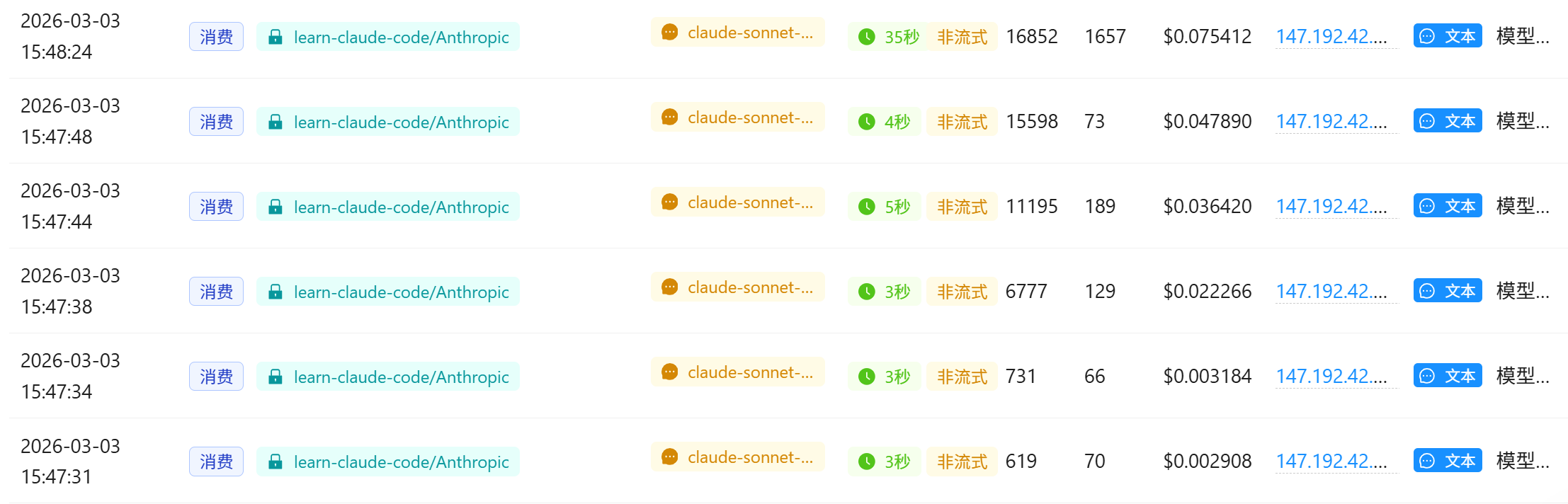
">> skill 和 function call有什么区别和联系?"
日志中出现了两个核心报错,它们是因果关系:
- 核心诱因:
UnicodeDecodeError: 'gbk' codec can't decode...
在 Windows 系统的中文环境下,命令行的默认编码通常是 GBK (CP936)。 我的代码中使用了 subprocess.run(..., text=True):
text=True 会让 Python 尝试把命令行输出的字节流(bytes)解码成字符串(str)。因为没有指定编码,Python 使用了系统默认的 GBK。但是,docs/zh/s02-tool-use.md 文件里包含大量中文字符,且文件本身是 UTF-8 编码的。
当 type 命令把 UTF-8 的字节流喷到终端时,Python 强行用 GBK 去解码,遇到无法匹配的字节(比如 0xaa),就会抛出 UnicodeDecodeError 异常。
- 连锁反应:
TypeError: unsupported operand type(s) for +: 'NoneType' and 'str'
由于上面的解码错误发生在 subprocess 内部读取 stdout 的线程中,导致 r.stdout 并没有被正确赋值,变成了 None。 随后代码执行到 out = (r.stdout + r.stderr).strip() 时,试图把 None 和字符串相加,最终导致了 Agent 的彻底崩溃退出。
解决编码问题
r = subprocess.run(command, shell=True, cwd=os.getcwd(),
                           capture_output=True, text=True, timeout=120,
++                         encoding='utf-8', errors='replace') # 显式指定 utf-8 并替换乱码
继续提问相同的问题
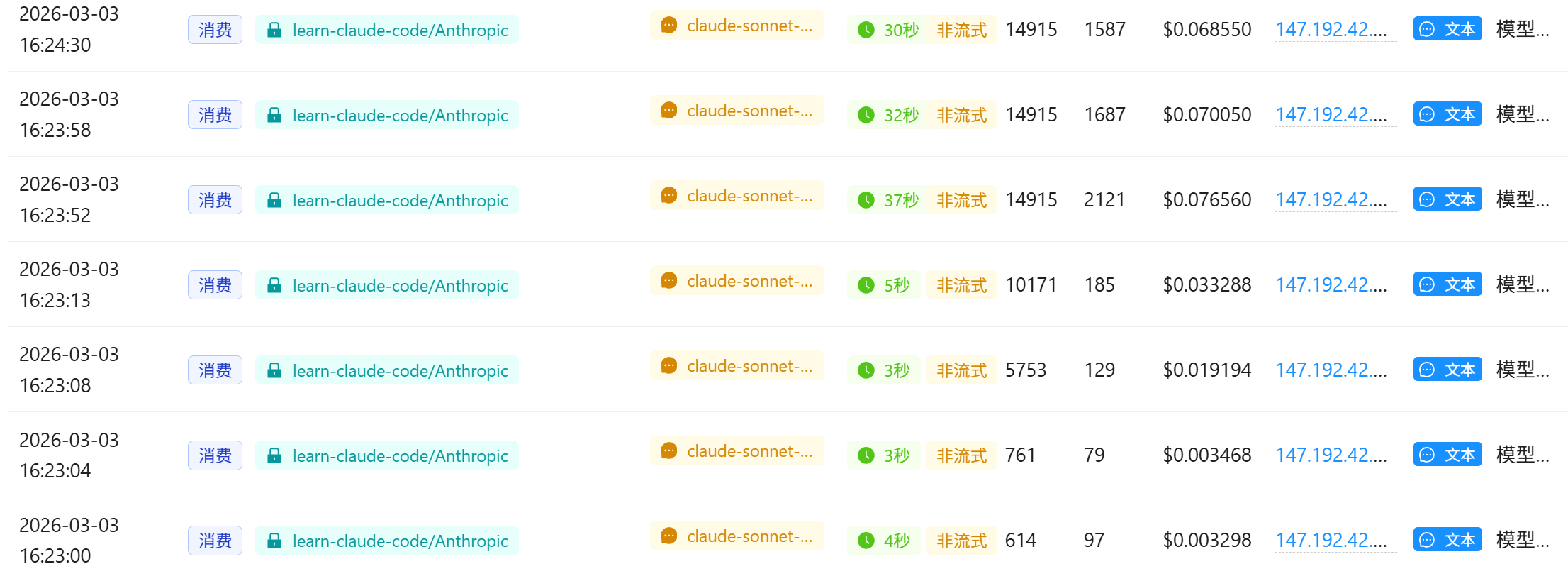
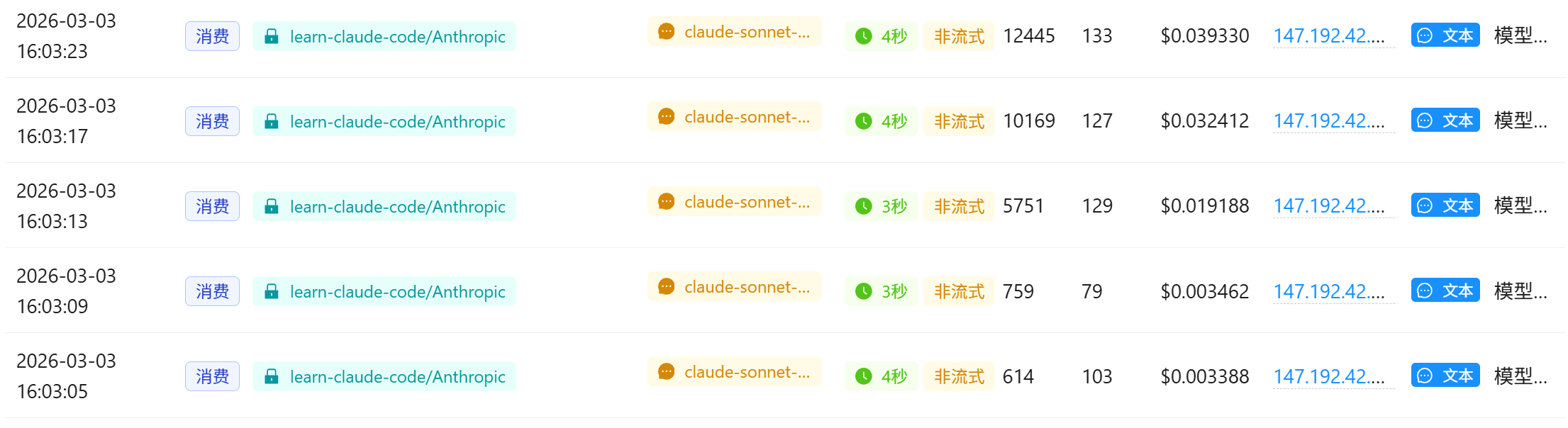
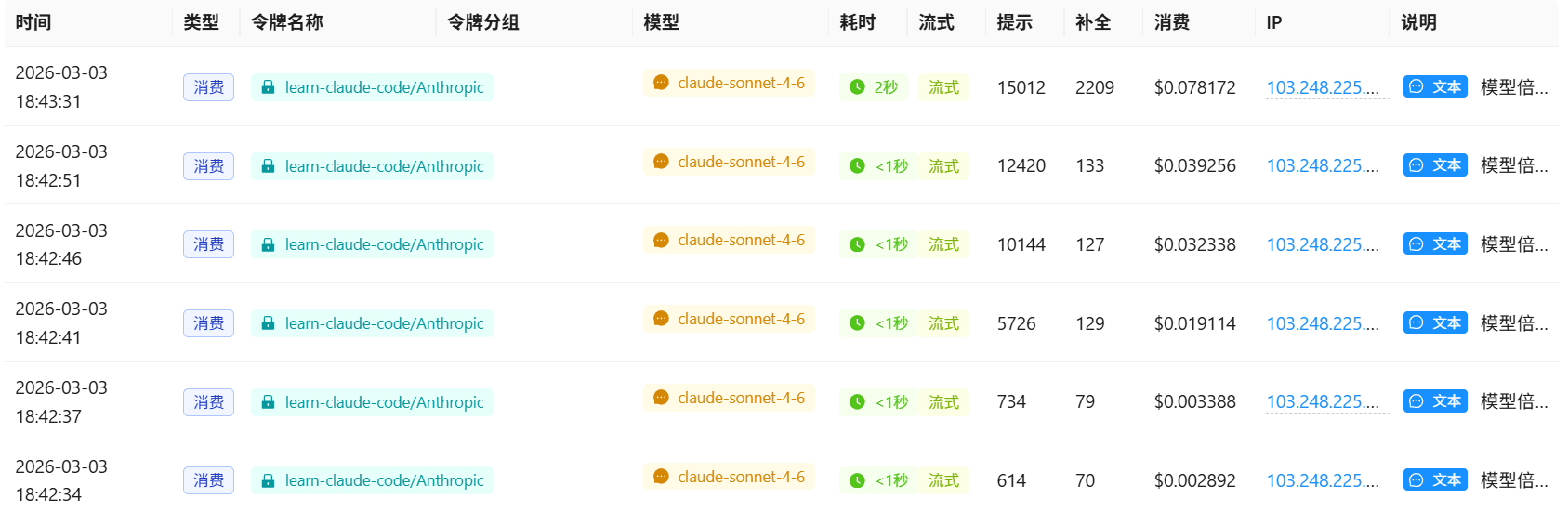
感觉是网络通信问题方面:
- 上下文体积庞大 (Context Bloat): 到后面几轮时,Agent 的
messages历史中塞满了项目目录树、2 个 Python 脚本源码、2 个 Skill 配置文件、2 个长篇中文文档。这种请求的输入 Token 高达14,000+到16,000+。 - 长文本生成耗时过长: 当 LLM 接收到这 1.5 万 token 的上下文,并试图撰写一篇详尽的中文对比长文时,推理和生成需要很长时间。
- 网关或代理超时 (Timeout / Disconnect): 因为使用了自定义的中转 API (
os.getenv("ANTHROPIC_BASE_URL")),很多中转服务商(或者本地的科学上网客户端)默认的 TCP/HTTP 闲置超时时间是 30 秒。当 API 等待超过 30 秒还没返回完整数据时,中转服务器或代理主动掐断了连接,导致 Python 客户端抛出 "Server disconnected"。
流式上下文
让官方服务器一有思路就马上发数据,每隔毫秒级网络链路上就会有数据流动,中间代理网关的“闲置超时倒计时”就会不断被重置,连接也就不会被掐断。
Anthropic 的 Python SDK 提供有封装工具 messages.stream(), 将 agent_loop 函数中的 client.messages.create 部分替换为流式上下文管理器
def agent_loop(messages: list):
    while True:
        with client.messages.stream(
            model=MODEL, system=SYSTEM, messages=messages,
            tools=TOOLS, max_tokens=8000
        ) as stream:
            # 遍历 text_stream,实现打字机效果的实时输出
            # end="" 防止了每次打印都换行
            # flush=True 会强制 Python 绕过系统缓冲区,立刻把接收到的字符推送到终端屏幕上
            for text in stream.text_stream:
                print(text, end="", flush=True)

            print()
            # 阻塞等待,直到获取完整的 Message 对象
            response = stream.get_final_message()

        # Append assistant turn
        messages.append({"role": "assistant", "content": response.content})
        ...
输出
(llm) D:\code\Agent\learn-claude-code>python agents\s01_agent_loop.py
s01 >> skill 和 function call有什么区别和联系?
$ find D:\code\Agent\learn-claude-code -type f | head -50
'head' �����ڲ����ⲿ���Ҳ���ǿ����еij���
���������ļ���
$ dir D:\code\Agent\learn-claude-code /s /b 2>nul | findstr /v ".git"
D:\code\Agent\learn-claude-code\.env
D:\code\Agent\learn-claude-code\.env.example
D:\code\Agent\learn-claude-code\.vscode
D:\code\Agent\learn-claude-code\agents
D:\code\Agent\learn-claude-code\docs
D:
$ type D:\code\Agent\learn-claude-code\agents\s02_tool_use.py
#!/usr/bin/env python3
"""
s02_tool_use.py - Tools
The agent loop from s01 didn't change. We just added tools to the array
and a dispatch map to route calls.
+----------+ +-------+ +--
$ type D:\code\Agent\learn-claude-code\agents\s05_skill_loading.py
#!/usr/bin/env python3
"""
s05_skill_loading.py - Skills
Two-layer skill injection that avoids bloating the system prompt:
Layer 1 (cheap): skill names in system prompt (~100 tokens/skill)
L
$ type D:\code\Agent\learn-claude-code\skills\code-review\SKILL.md
---
name: code-review
description: Perform thorough code reviews with security, performance, and maintainability analysis. Use when user asks to review code, check for bugs, or audit a codebase.
---
$ type D:\code\Agent\learn-claude-code\skills\pdf\SKILL.md
---
name: pdf
description: Process PDF files - extract text, create PDFs, merge documents. Use when user asks to read PDF, create PDF, or work with PDF files.
---
# PDF Processing Skill
You now have
$ type D:\code\Agent\learn-claude-code\docs\zh\s02-tool-use.md
# s02: Tool Use (工具使用)
`s01 > [ s02 ] s03 > s04 > s05 > s06 | s07 > s08 > s09 > s10 > s11 > s12`
> *"加一个工具, 只加一个 handler"* -- 循环不用动, 新工具注册进 dispatch map 就行。
## 问题
只有 `bash` 时, 所有操作都走 shell。`cat` 截
$ type D:\code\Agent\learn-claude-code\docs\zh\s05-skill-loading.md
# s05: Skills (技能加载)
`s01 > s02 > s03 > s04 > [ s05 ] s06 | s07 > s08 > s09 > s10 > s11 > s12`
> *"用到什么知识, 临时加载什么知识"* -- 通过 tool_result 注入, 不塞 system prompt。
## 问题
你希望智能体遵循特定领域的工作流: git 约定、测试模式、代码
好的,我已经通读了项目的核心代码和文档。下面是对 **Skill** 和 **Function Call** 的深度对比解析:
---
## 一句话总结
| 概念 | 本质 |
|------|------|
| **Function Call (工具调用)** | LLM 与外部世界交互的**机制** —— 让模型能执行代码、读写文件、调用 API |
| **Skill (技能)** | 通过 Function Call 机制注入的**领域知识** —— 告诉模型"怎么做某件事"的 Markdown 文档 |
> **类比**: Function Call 是"嘴巴",Skill 是"说话的内容"。
---
## Function Call 是什么?
Function Call 是 LLM API 层面的机制。当你向 Claude 传入 `tools` 参数时,模型可以返回 `tool_use` 类型 的响应,让代码来执行真实操作。
```python
# s02_tool_use.py 的核心结构
# 1. 定义工具 schema(告诉 LLM 有哪些工具、参数是什么)
TOOLS = [
{"name": "bash", "description": "Run a shell command.", ...},
{"name": "read_file", "description": "Read file contents.", ...},
{"name": "write_file", "description": "Write content to file.",...},
{"name": "edit_file", "description": "Replace exact text.", ...},
]
# 2. Dispatch Map(工具名 → Python 函数的路由表)
TOOL_HANDLERS = {
"bash": lambda **kw: run_bash(kw["command"]),
"read_file": lambda **kw: run_read(kw["path"], kw.get("limit")),
"write_file": lambda **kw: run_write(kw["path"], kw["content"]),
"edit_file": lambda **kw: run_edit(kw["path"], kw["old_text"], kw["new_text"]),
}
# 3. Agent Loop 中处理调用
for block in response.content:
if block.type == "tool_use":
handler = TOOL_HANDLERS.get(block.name)
output = handler(**block.input) # 真实执行
results.append({"type": "tool_result", "tool_use_id": block.id, "content": output})
```
**Function Call 的数据流**:
```
LLM 输出 tool_use → Python 执行 handler → tool_result 返回给 LLM
```
---
## Skill 是什么?
Skill 是一个**知识注入模式**,不是 API 层的概念。它本质上是存在 `SKILL.md` 文件里的 Markdown 文档,通过 **两层延迟加载** 来节省 token:
```
skills/
pdf/
SKILL.md ← YAML frontmatter(元数据)+ Markdown 正文(详细知识)
code-review/
SKILL.md
```
**两层注入策略**(`s05_skill_loading.py`):
```
Layer 1(便宜,常驻 System Prompt):
┌─────────────────────────────────────┐
│ Skills available: │
│ - pdf: Process PDF files... │ ← 仅 ~100 tokens/技能
│ - code-review: Review code... │
└─────────────────────────────────────┘
Layer 2(昂贵,按需加载到 tool_result):
当 LLM 调用 load_skill("pdf") 时:
┌─────────────────────────────────────┐
│ <skill name="pdf"> │
│ ## Reading PDFs │ ← 完整知识,~2000 tokens
│ pdftotext input.pdf ... │
│ ... │
│ </skill> │
└─────────────────────────────────────┘
```
**Skill 的核心代码**:
```python
class SkillLoader:
def get_descriptions(self) -> str:
# Layer 1: 只返回名字+描述,注入 system prompt
return " - pdf: Process PDF files...\n - code-review: ..."
def get_content(self, name: str) -> str:
# Layer 2: 返回完整 SKILL.md 正文,通过 tool_result 注入
return f'<skill name="{name}">\n{skill["body"]}\n</skill>'
# load_skill 本质上就是一个普通的 Function Call
TOOL_HANDLERS = {
"load_skill": lambda **kw: SKILL_LOADER.get_content(kw["name"]),
# ↑ Skill 通过 Function Call 来传递内容!
}
```
---
## 核心区别与联系
```
┌─────────────────────────────────────────────────────────────┐
│ Skill vs Function Call │
├────────────────┬────────────────────┬───────────────────────┤
│ 维度 │ Function Call │ Skill │
├────────────────┼────────────────────┼───────────────────────┤
│ 本质 │ 执行机制 │ 知识文档 │
│ 作用 │ 做事(执行代码) │ 学知识(读指南) │
│ 产物 │ 操作结果(文件、 │ 知识文本(注入 LLM │
│ │ 命令输出等) │ 上下文) │
│ token 消耗 │ 工具调用本身很轻 │ 全文加载较重 │
│ 延迟加载 │ 无此概念 │ 两层懒加载 │
│ 实现层 │ API 协议层 │ 应用设计层 │
│ 可扩展性 │ 加 handler + schema│ 加 SKILL.md 文件即可 │
└────────────────┴────────────────────┴───────────────────────┘
```
**联系**:Skill 是**借用 Function Call 机制**来传递知识的:
```
用户说 "帮我审查代码"
↓
LLM 识别需要 code-review 专业知识
↓
LLM 发出 Function Call: load_skill("code-review") ← 这是 Function Call
↓
Python 读取 SKILL.md,把完整内容返回为 tool_result ← 这是 Skill 内容
↓
LLM 获得专业知识,开始执行代码审查
↓
LLM 发出 Function Call: bash("grep -rn 'password' .") ← 这又是 Function Call
```
---
## 为什么要有 Skill 而不全用 System Prompt?
```
❌ 全部塞进 System Prompt:
10 个技能 × 2000 token = 20,000 token (每次请求都浪费)
✅ Skill 两层加载:
Layer 1: 10 × 100 token = 1,000 token (常驻)
Layer 2: 按需加载 1 个 = 2,000 token (用到才加)
实际消耗: 3,000 token(节省 85%)
```
**结论**:
- **Function Call** = 工具,让 LLM 能"做事"(执行、读写、操作)
- **Skill** = 知识,让 LLM 能"懂事"(掌握领域专业流程)
- **Skill 通过 Function Call 来传递**:`load_skill` 本身就是一个 Function Call,只不过它返回的不是操 作结果,而是知识文本
好的,我已经通读了项目的核心代码和文档。下面是对 **Skill** 和 **Function Call** 的深度对比解析:
---
## 一句话总结
| 概念 | 本质 |
|------|------|
| **Function Call (工具调用)** | LLM 与外部世界交互的**机制** —— 让模型能执行代码、读写文件、调用 API |
| **Skill (技能)** | 通过 Function Call 机制注入的**领域知识** —— 告诉模型"怎么做某件事"的 Markdown 文档 |
> **类比**: Function Call 是"嘴巴",Skill 是"说话的内容"。
---
## Function Call 是什么?
Function Call 是 LLM API 层面的机制。当你向 Claude 传入 `tools` 参数时,模型可以返回 `tool_use` 类型 的响应,让代码来执行真实操作。
```python
# s02_tool_use.py 的核心结构
# 1. 定义工具 schema(告诉 LLM 有哪些工具、参数是什么)
TOOLS = [
{"name": "bash", "description": "Run a shell command.", ...},
{"name": "read_file", "description": "Read file contents.", ...},
{"name": "write_file", "description": "Write content to file.",...},
{"name": "edit_file", "description": "Replace exact text.", ...},
]
# 2. Dispatch Map(工具名 → Python 函数的路由表)
TOOL_HANDLERS = {
"bash": lambda **kw: run_bash(kw["command"]),
"read_file": lambda **kw: run_read(kw["path"], kw.get("limit")),
"write_file": lambda **kw: run_write(kw["path"], kw["content"]),
"edit_file": lambda **kw: run_edit(kw["path"], kw["old_text"], kw["new_text"]),
}
# 3. Agent Loop 中处理调用
for block in response.content:
if block.type == "tool_use":
handler = TOOL_HANDLERS.get(block.name)
output = handler(**block.input) # 真实执行
results.append({"type": "tool_result", "tool_use_id": block.id, "content": output})
```
**Function Call 的数据流**:
```
LLM 输出 tool_use → Python 执行 handler → tool_result 返回给 LLM
```
---
## Skill 是什么?
Skill 是一个**知识注入模式**,不是 API 层的概念。它本质上是存在 `SKILL.md` 文件里的 Markdown 文档,通过 **两层延迟加载** 来节省 token:
```
skills/
pdf/
SKILL.md ← YAML frontmatter(元数据)+ Markdown 正文(详细知识)
code-review/
SKILL.md
```
**两层注入策略**(`s05_skill_loading.py`):
```
Layer 1(便宜,常驻 System Prompt):
┌─────────────────────────────────────┐
│ Skills available: │
│ - pdf: Process PDF files... │ ← 仅 ~100 tokens/技能
│ - code-review: Review code... │
└─────────────────────────────────────┘
Layer 2(昂贵,按需加载到 tool_result):
当 LLM 调用 load_skill("pdf") 时:
┌─────────────────────────────────────┐
│ <skill name="pdf"> │
│ ## Reading PDFs │ ← 完整知识,~2000 tokens
│ pdftotext input.pdf ... │
│ ... │
│ </skill> │
└─────────────────────────────────────┘
```
**Skill 的核心代码**:
```python
class SkillLoader:
def get_descriptions(self) -> str:
# Layer 1: 只返回名字+描述,注入 system prompt
return " - pdf: Process PDF files...\n - code-review: ..."
def get_content(self, name: str) -> str:
# Layer 2: 返回完整 SKILL.md 正文,通过 tool_result 注入
return f'<skill name="{name}">\n{skill["body"]}\n</skill>'
# load_skill 本质上就是一个普通的 Function Call
TOOL_HANDLERS = {
"load_skill": lambda **kw: SKILL_LOADER.get_content(kw["name"]),
# ↑ Skill 通过 Function Call 来传递内容!
}
```
---
## 核心区别与联系
```
┌─────────────────────────────────────────────────────────────┐
│ Skill vs Function Call │
├────────────────┬────────────────────┬───────────────────────┤
│ 维度 │ Function Call │ Skill │
├────────────────┼────────────────────┼───────────────────────┤
│ 本质 │ 执行机制 │ 知识文档 │
│ 作用 │ 做事(执行代码) │ 学知识(读指南) │
│ 产物 │ 操作结果(文件、 │ 知识文本(注入 LLM │
│ │ 命令输出等) │ 上下文) │
│ token 消耗 │ 工具调用本身很轻 │ 全文加载较重 │
│ 延迟加载 │ 无此概念 │ 两层懒加载 │
│ 实现层 │ API 协议层 │ 应用设计层 │
│ 可扩展性 │ 加 handler + schema│ 加 SKILL.md 文件即可 │
└────────────────┴────────────────────┴───────────────────────┘
```
**联系**:Skill 是**借用 Function Call 机制**来传递知识的:
```
用户说 "帮我审查代码"
↓
LLM 识别需要 code-review 专业知识
↓
LLM 发出 Function Call: load_skill("code-review") ← 这是 Function Call
↓
Python 读取 SKILL.md,把完整内容返回为 tool_result ← 这是 Skill 内容
↓
LLM 获得专业知识,开始执行代码审查
↓
LLM 发出 Function Call: bash("grep -rn 'password' .") ← 这又是 Function Call
```
---
## 为什么要有 Skill 而不全用 System Prompt?
```
❌ 全部塞进 System Prompt:
10 个技能 × 2000 token = 20,000 token (每次请求都浪费)
✅ Skill 两层加载:
Layer 1: 10 × 100 token = 1,000 token (常驻)
Layer 2: 按需加载 1 个 = 2,000 token (用到才加)
实际消耗: 3,000 token(节省 85%)
```
**结论**:
- **Function Call** = 工具,让 LLM 能"做事"(执行、读写、操作)
- **Skill** = 知识,让 LLM 能"懂事"(掌握领域专业流程)
- **Skill 通过 Function Call 来传递**:`load_skill` 本身就是一个 Function Call,只不过它返回的不是操 作结果,而是知识文本